Docker Compose
Single-node deployment and local dev with Docker Compose.
Docker Compose runs the entire OpenAgentic platform on a single host. This is the recommended path for local development and single-node installs. You configure one .env file to bootstrap the stack; providers, MCP servers, and credentials are managed at runtime in the admin console.
OpenAgentic is a self-hosted platform. It emits full OpenTelemetry observability, but that stays on the host — nothing is exported to any external endpoint — and your data does not leave the host.
Before you begin
Make sure the host meets the following requirements:
| Requirement | Detail |
|---|---|
| Docker | Required |
| Docker Compose | v2 |
| Model provider | A local Ollama is the recommended default — free, offline, no API keys. The shipped compose even bundles an ollama container that pulls the embedding model on first boot, so embeddings work out of the box. A cloud provider is an optional alternative. |
| Memory | About 8 GB RAM |
| Disk | About 20 GB |
Important: The chat model must be tool-capable. OpenAgentic always attaches tools to provider calls, so a model without tool support is rejected at boot. For example, a plain
gemma3:1breturnsdoes not support tools. Use a tool-capable model family such as Llama 3, Qwen, DeepSeek, or Mistral, or a cloud model. Tool capability is probed automatically on startup.
Drive Compose yourself
The one-line installer fetches the pre-built compose bundle into ~/.openagentic and brings the stack up for you. If you’d rather configure and drive Compose by hand after the bundle is in place:
cd ~/.openagenticcp .env.example .env# Edit .env: set POSTGRES_PASSWORD, ADMIN_USER_EMAIL, ADMIN_SEED_PASSWORD, and OLLAMA_HOST.docker compose up -dopen http://localhost:8080The bundle’s docker-compose.yml pulls pre-built images from ghcr.io/agentic-work/* — nothing is compiled locally.
Note: Milvus is optional. The shipped stack runs pgvector-only by default (
SKIP_TOOL_SEMANTIC_CACHE=true), so a baredocker compose up -dboots healthy with no Milvus — MCP tool search and embeddings live in the Postgres pgvector columns. Enable the Milvus vector store only for large embedding or RAG workloads: rundocker compose --profile milvus up -dwithMILVUS_ENABLED=trueandSKIP_TOOL_SEMANTIC_CACHE=falsein.env(or pass--milvusto the installer). When Milvus is enabled but unreachable, the API exits after its retry budget rather than degrading silently. The installer and setup wizard bring themilvusprofile up so the containers are present, but the API still runs pgvector-only unless you flip those two flags.
Note: Prebuilt public images from GHCR (
ghcr.io/agentic-work/openagentic-*) are pulled atdocker compose uptime — nothing is compiled on your machine. TheOPENAGENTIC_REGISTRYandOPENAGENTIC_TAGenvironment variables let you point at your own registry for air-gapped installs.
On first boot, the stack pulls the embedding model into Ollama (about 270 MB) and runs Prisma schema setup, MCP tool indexing (and Milvus collection initialization, if Milvus is enabled). The API typically reports healthy in about 90 seconds. Plan for about 3 to 5 minutes for the full stack on the first run, and about 30 seconds on subsequent starts. The containers are not hung during the first build; watch them come up.
Services in the stack
A bare docker compose up -d brings up the application services and their datastores. Adding --profile milvus also brings up the Milvus vector store (the heaviest part of the stack); it is optional and off by default.
| Service | Role | Port |
|---|---|---|
ui | Web application | UI_HOST_PORT (default 8080, mapped to container :80) |
api | Core REST API: chat, flows, providers, RAG, memory, audit | :8000 (internal) |
workflows | Flows execution engine | :3400 (internal) |
mcp-proxy | Spawns and routes the bundled MCP servers | :8080 (internal) |
proxy | Agent orchestration and model-routing proxy | :3300 (internal) |
searxng | Self-hosted metasearch backend for the web MCP | :8080 (internal) |
postgres | pgvector-enabled datastore | :5432 (internal) |
redis | Cache, queues, and pub/sub | :6379 (internal) |
ollama | Local model runtime (--profile ollama, or point at an external Ollama) | :11434 (internal) |
etcd, minio, milvus | Milvus vector store stack (--profile milvus, optional) | Milvus :19530 (internal) |
prometheus, loki, promtail, otel-collector | Observability stack (--profile monitoring, optional) | Prometheus :9090 |
Only the ui port (default 8080) is published to the host by default; the prometheus port (9090) is published only when you bring up the optional --profile monitoring stack. All other services communicate over the internal Docker network.
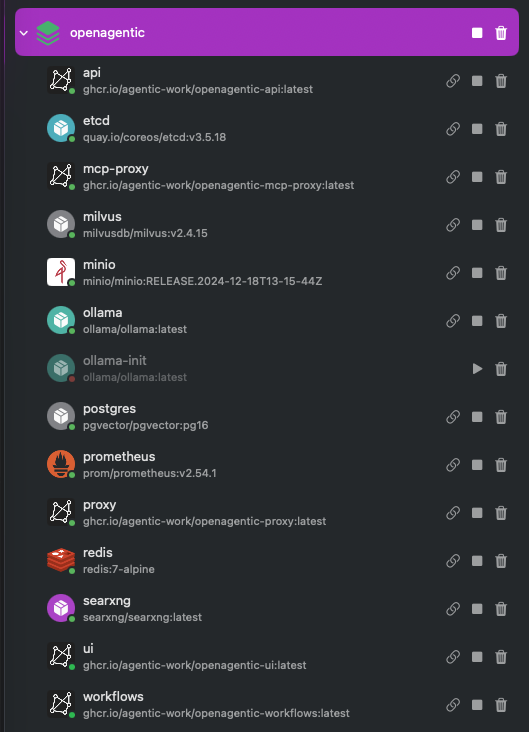
openagentic Compose project (shown here in OrbStack). One docker compose --profile milvus up -d brought up all of it on a single machine.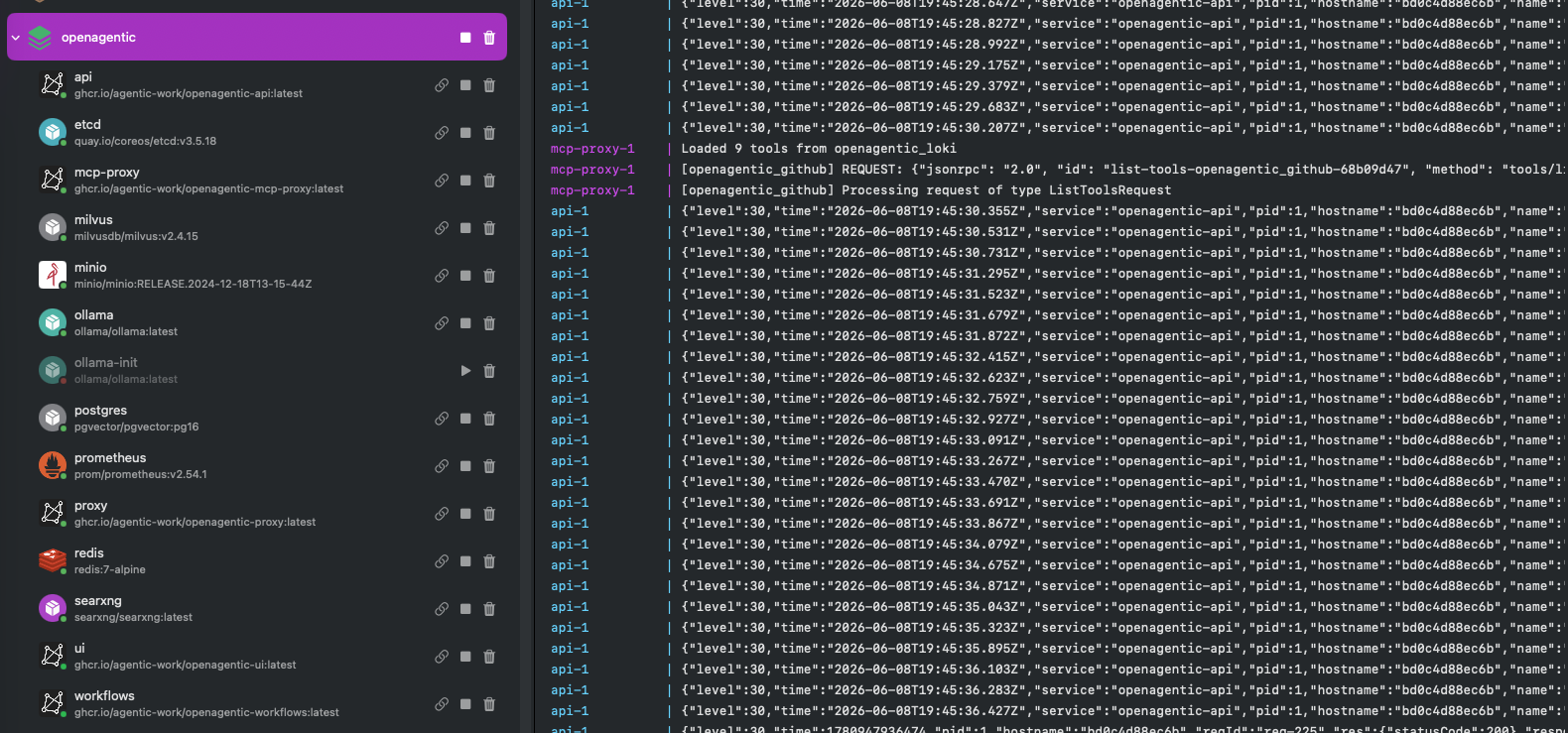
api container indexing MCP tools into pgvector and Milvus. The stack is healthy and serving within about 90 seconds.Note: The Milvus stack (etcd, MinIO, and Milvus) is the heaviest part of the deployment and is gated behind
--profile milvus. Tool embeddings are stored in pgvector (HNSW index) as the primary source of truth; when Milvus is enabled it serves as the degraded-mode fallback for the semantic tool router and backs the heavier per-user memory and RAG collections. Milvus is optional — the default stack runs pgvector-only. To conserve memory, pointOLLAMA_HOSTat a remote host and reserve RAM for it.
Configure with .env
The .env.example file covers the bootstrap settings. Copy it to .env and edit the values before the first docker compose up.
# Datastore and admin bootstrapPOSTGRES_USER=openagenticPOSTGRES_PASSWORD=... # Required. Set a long, random string.POSTGRES_DB=openagenticADMIN_SEED_PASSWORD=...
# Local model provider (recommended default — free, offline, no API keys).# https://ollama.com — point at any reachable Ollama host.OLLAMA_HOST=http://host.docker.internal:11434OLLAMA_EMBED_MODEL=nomic-embed-text # Default embedding model (~270 MB, CPU-only).OLLAMA_CHAT_MODEL=qwen2.5:7b # A tool-capable chat model — chat with no cloud keys.
# UI portUI_HOST_PORT=8080
# Registry (defaults to GHCR; override for self-hosting)OPENAGENTIC_REGISTRY=ghcr.io/agentic-workOPENAGENTIC_TAG=latestCaution: Internal-auth secrets must match across services. Set the same values for
JWT_SECRET,SIGNING_SECRET, andINTERNAL_API_KEYin theapi,mcp-proxy, andworkflowsservices. Compose passes the same values automatically; note thatmcp-proxyreadsINTERNAL_API_KEYasAPI_INTERNAL_KEY. The development fallbacks end in-change-me. Set real values for anything beyond a local trial; otherwise sessions are invalidated on every restart.
Optional: cloud provider keys
The default local Ollama path needs no key at all — just point OLLAMA_HOST at a reachable Ollama. Cloud providers are optional. Providers are pluggable: bootstrap seeds one provider (Ollama by default); you add more from the admin console after first boot. Set only the keys for the providers you use; the rest stay disabled.
# Ollama needs no key (the default — see above).# Add any of these only if you want a cloud provider as well:# ANTHROPIC_API_KEY=sk-ant-...# OPENAI_API_KEY=sk-...# AZURE_OPENAI_API_KEY=...# GOOGLE_GENERATIVE_AI_API_KEY=...# AWS_ACCESS_KEY_ID and AWS_SECRET_ACCESS_KEY (for Bedrock)Configure cloud MCP credentials
In the self-hosted build, cloud MCP servers authenticate with static, service-account credentials only. There is no IdP-based on-behalf-of (OBO) delegation. Provide credentials in either of two ways:
- Mount your host credential directories. The
mcp-proxyservice mounts~/.aws,~/.azure,~/.config/gcloud, and~/.kuberead-only. - Use the
~/.openagentic/cloud-secrets/{aws,azure,gcp}.envfiles that the installer creates as a fallback.
An MCP server with no credentials and no enable flag stays off.
Everything else, including which MCP servers are enabled, model routing, and governance, is configured in the admin console after first boot. Per-server enable and disable is controlled by the OpenAgentic_<NAME>_MCP_DISABLED environment flags.
Bundled MCP servers
The proxy registers 9 built-in MCP servers through mcp_manager.initialize_servers. They fall into three groups:
- Cloud:
aws,azure,gcp. These require outbound cloud control-plane API access and static service-account credentials. - Ops and observability:
kubernetes,prometheus,loki. - Knowledge and meta:
web,github,admin.
The credential-free servers (web and admin) start out of the box. The cloud and credentialed servers become available once you add credentials. For the full reference, see MCP servers.
Update and tear down
To check health after launch:
docker compose pscurl -s http://localhost:8080/ | head -20The UI container answers on port 8080. To check API health directly (internal port 8000 via the Docker network), you would exec into a container or use docker compose’s network. The above curl to port 8080 verifies the UI is responding.
To update, pull the latest images, then recreate the containers. (Append the same --profile flags you started with — e.g. --profile milvus and/or --profile monitoring — if you enabled those optional stacks.)
docker compose pulldocker compose up -dTo stop everything while keeping volumes and data:
docker compose downTo stop and wipe all data:
docker compose down -vCaution:
docker compose down -vis destructive and deletes all stored data.
Note: Re-running the installer on an existing
~/.openagenticcheckout fast-forwards to upstream and re-applies your.env.
Status (v1.0.0, Open Field)
Chat and Flows run end-to-end against your provider. The bundled MCP servers are deployed, registered, and discoverable from the admin console; their tools route semantically and execute in chat. Every write is gated behind a human approval step and recorded in an immutable audit log, so nothing that mutates your infrastructure runs until you approve it. The platform emits full OpenTelemetry observability that stays on the host — nothing is exported externally — and your data does not leave the host.
What’s next
- For multi-node or production deployments, use the Helm chart.
- For the full MCP server reference, see MCP servers.