openagentics

A companion product from [agenticwork]

Gnomus Code — the coding agent for your platform.

Claude-Code-class. On your models, your machine, your rules. One coding agent, three ways to run it — pick the one that fits where your code already lives.

Gnomus Code is a compiled Gnomus product — building from source is available to platform users. Install steps ↓

One engine · three surfaces

Three ways to run it.

The same coding agent, wherever you want it — a native desktop app, a terminal you already live in, or governed inside the platform.

Desktop app

macOS · Windows — build from source

A native shell, not a terminal in a window

The agent runs locally and renders a real UI — chat bubbles, slash-command modals, a file panel, drag-and-drop files with vision, and a cloud-aware model picker. Self-contained: the CLI engine and ripgrep ship inside. Build it and copy it to Applications.

  • Tauri 2 + React native shell
  • Drag-and-drop files with vision
  • Cloud-aware model picker

CLI / TUI

Platform users · bundled in the desktop app

The same engine, in your terminal

A terminal-native coding agent — the exact engine behind the desktop app, for the keyboard-first and the headless box. It ships inside the desktop download and is available to Gnomus users.

  • Same engine as the desktop app
  • Headless / SSH / CI friendly
  • No phone-home, logs stay local

CodeMode

Inside AgenticWork — the enterprise way

The agent, with the platform behind it

The same agent embedded in Gnomus, with a lot of power behind it: human-in-the-loop approval gates, an append-only audit, isolated secure pods, MCP tools that run under your own identity, and fleet / mission orchestration.

  • HITL approval gates + append-only audit
  • Isolated secure pods · MCP under your identity
  • Fleet & Mission orchestration
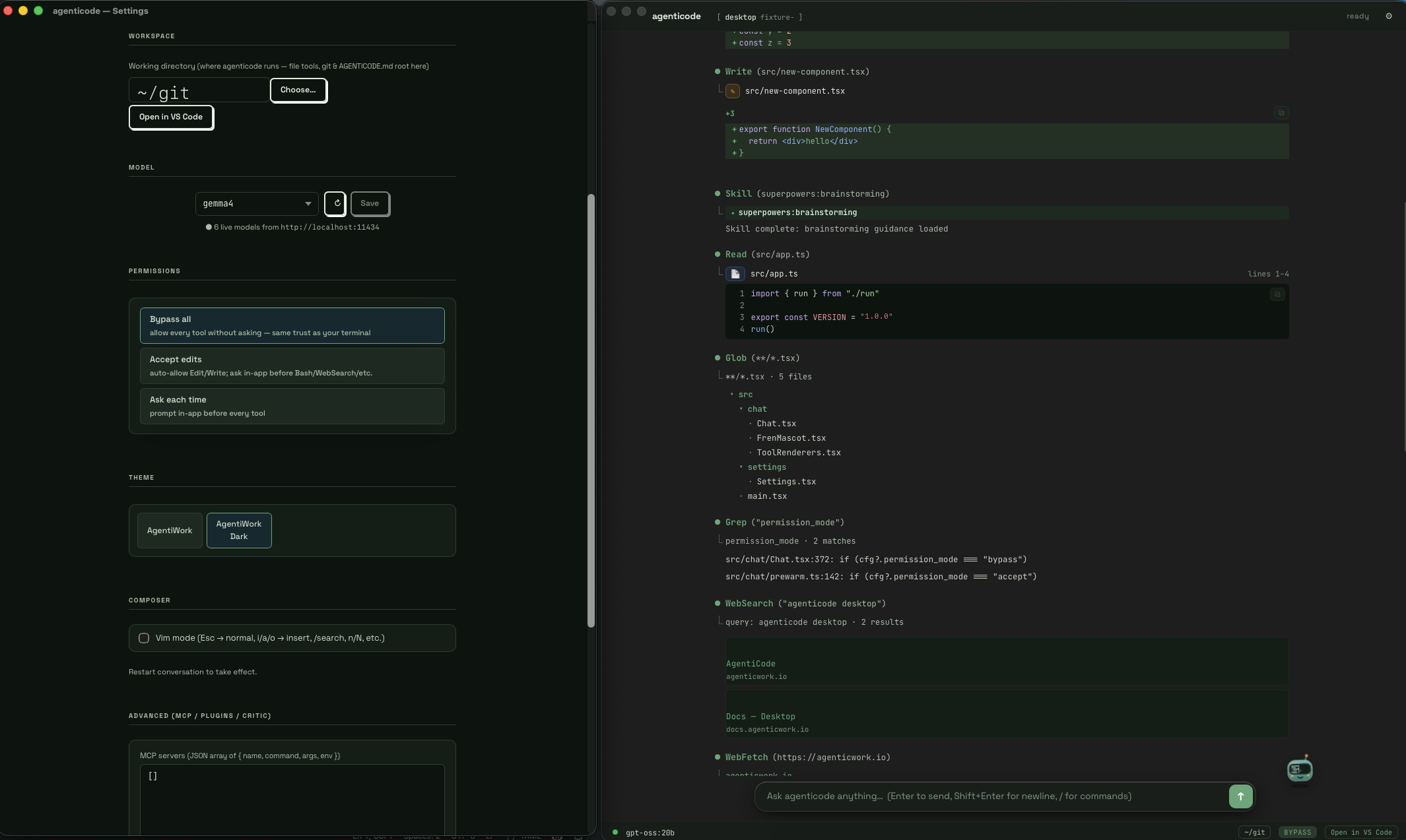
The native macOS Gnomus Code app — a left rail with the provider and model picker, per-turn permission modes (Bypass all, Accept edits, Ask each time) and theme, beside the agent doing real tool-driven coding work
The native macOS app. The provider and model picker, per-turn permission modes — Bypass all · Accept edits · Ask each time — and the agent doing tool-driven coding work, side by side. The same engine ships in the terminal.

Install from source

Build it, run it locally.

Gnomus Code ships as source to Gnomus users. Clone the repo, build, and you have the terminal agent and the native desktop app on your own machine — no signed installer to wait on, nothing fetched from a CDN.

Before you start

  • CLI / TUI — Node 20+, npm 10+, git
  • Desktop build — also Rust, the Tauri CLI, Bun, and pnpm

CLI / TUI — the terminal coding agent

# the repo is available to Gnomus users
git clone <the Gnomus Code repo>
cd agenticode
npm install
npm run build
npm link --force          # replaces any older agenticode on PATH
agenticode                # launches the TUI

Desktop app — build, then copy to Applications

# macOS (Apple Silicon) — from the cloned repo
cd desktop
pnpm install
pnpm exec tauri build --target aarch64-apple-darwin --bundles app
cp -R src-tauri/target/aarch64-apple-darwin/release/bundle/macos/agenticode.app /Applications/

On Windows, run the same Tauri build for the Windows target and launch the bundled app. The build is unsigned — on macOS, right-click the app → Open the first time; on Windows, if SmartScreen appears, choose More info → Run anyway.

Pick your provider after install

Gnomus Code points at whichever model endpoint you already use — Ollama, the Gnomus, AWS Bedrock, Google Vertex AI, or Azure Foundry. Choose one when you first run it; switch per task whenever you like.

Runs anywhere · any provider

Runs anywhere your code does.

No lock-in to one cloud or one model. Point it at a local model on your laptop or a frontier endpoint in your own account — swap per task.

Where it runs

  • Your laptop
  • A sandbox
  • An air-gapped box
  • Your Ollama host

Any provider

  • Ollama
  • Gnomus
  • AWS Bedrock
  • Google Vertex AI
  • Azure Foundry

Your telemetry, your monitoring

Observability that points at you — nothing else leaves.

Gnomus Code writes structured pino logs to ~/.agenticode/logs, and exposes an opt-in Prometheus /metrics endpoint over OpenTelemetry. The observability data flows to your monitoring stack and nowhere else — there is no phone-home.

  • Structured logs — JSON via pino to ~/.agenticode/logs
  • Opt-in /metrics — Prometheus / OpenTelemetry, off by default
  • To your stack only — nothing leaves your machine on its own

Pair it with OpenAgentic

Run the platform it pairs with.

Stand up OpenAgentic — your own self-hosted, open-source agent platform — and point Gnomus Code at it. One command to run it.

Install OpenAgentic →

The governed way

Run it inside Gnomus.

CodeMode brings the same agent into the platform — approval gates, append-only audit, isolated pods, fleets and missions. The enterprise way to run it.

[agenticwork]